
When it comes to car maintenance, having the right tools can make all the difference. If you’re an Android user, you’ll want an OBD2 scanner that not only reads trouble codes but also offers real-time data and compatibility with various vehicles. With numerous options available, it can be tough to pick the best one for your needs. Let’s explore some of the top contenders that might just change the way you approach vehicle diagnostics.
BlueDriver Bluetooth Pro OBDII Scan Tool for iPhone & Android

If you’re a car owner looking to diagnose issues without the hassle of a mechanic visit, the BlueDriver Bluetooth Pro OBDII Scan Tool is your best choice for Android devices. This tool connects wirelessly to your phone, giving you access to over 7000 diagnostic capabilities, including check engine, ABS, and airbag systems. You can read and clear trouble codes in real-time, making it easy to monitor your vehicle’s health. With its user-friendly app and unlimited repair reports, you’ll find possible causes and fixes without needing a subscription. Plus, enjoy 24/7 customer support and a solid warranty for peace of mind.
Best For: Car owners looking for a cost-effective and convenient way to diagnose vehicle issues without a mechanic’s visit.
Pros:
- User-friendly app provides step-by-step repair videos and unlimited repair reports.
- Wireless connectivity allows easy access to diagnostics via Bluetooth on your smartphone or tablet.
- No subscription fees, offering a one-time purchase for lifetime access to features and support.
Cons:
- Limited to gas vehicles manufactured after 1996 in North America.
- Some advanced diagnostic features may require technical knowledge to interpret effectively.
- May not support all vehicle makes and models, potentially limiting its use for some users.
Veepeak OBDCheck BLE Bluetooth OBD II Scanner for iOS & Android

The Veepeak OBDCheck BLE Bluetooth OBD II Scanner is an ideal choice for vehicle owners seeking a reliable and wireless diagnostic tool for both iOS and Android devices. This scanner reads and clears trouble codes, allowing you to monitor your vehicle’s health effectively. It’s compatible with most 1996+ cars and light trucks in the US and supports OBD-II/EOBD vehicles in other regions. With Bluetooth LE connectivity, you can easily connect through compatible apps like Car Scanner and Torque without the hassle of pairing. Just remember, advanced diagnostics might be limited, so check app compatibility for specific features you need.
Best For: Vehicle owners looking for a reliable and wireless OBD-II diagnostic tool for both iOS and Android devices.
Pros:
- Easy wireless connection via Bluetooth LE without the need for pairing.
- Compatible with a wide range of vehicles from 1996 onwards, including light trucks.
- Allows for reading and clearing of trouble codes, helping to monitor vehicle health effectively.
Cons:
- Advanced diagnostics and special functions may not be supported for all makes/models.
- Some features or compatible apps may require additional purchases.
- Not compatible with certain diagnostic apps like Carly, MHD, or bootmod3.
OBDLink MX+ OBD2 Bluetooth Scanner for iPhone, Android, and Windows

For those looking to transform their smartphone into a professional-grade diagnostic tool, the OBDLink MX+ OBD2 Bluetooth Scanner stands out as an excellent choice. Compatible with iPhone, Android, and Windows, this scanner supports various apps like FORScan and Torque. It excels at clearing check engine lights and offers live parameters for ABS, SRS, and TPMS systems. With enhanced OEM support for brands like Ford and Toyota, it’s reliable for detailed diagnostics. Plus, its over-voltage protection guarantees safety. Weighing just 28 grams and backed by a strong warranty, it’s a top pick among users with a stellar 4.6-star rating.
Best For: The OBDLink MX+ OBD2 Bluetooth Scanner is best for automotive enthusiasts and DIYers who want to perform professional-grade diagnostics on their vehicles using their smartphones.
Pros:
- Easy Compatibility: Works seamlessly with iPhone, Android, and Windows devices.
- Comprehensive Diagnostics: Offers live parameters and enhanced OEM support for major car brands.
- Safety Features: Includes over-voltage protection and battery drain prevention for peace of mind.
Cons:
- Limited to Supported Apps: Requires specific apps like FORScan and Torque for full functionality.
- Size: While compact, some users may find its small size less ergonomic during use.
- Potential Learning Curve: May be challenging for beginners unfamiliar with vehicle diagnostics.
Veepeak Mini Bluetooth OBD2 Scanner for Android

Looking for a reliable OBD2 scanner that works seamlessly with your Android device? The Veepeak Mini Bluetooth OBD2 Scanner is an excellent choice for you. Compatible with most 1996+ OBD-II compliant vehicles, it lets you read and clear trouble codes, view freeze frame data, and monitor live sensor data like RPM and coolant temperature. You’ll need a compatible third-party app, such as Torque or Car Scanner, to use it. However, it doesn’t support advanced diagnostics or apps requiring specialized hardware. If you’re focused on basic diagnostics, this scanner is a solid fit for your needs.
Best For: Those looking for a budget-friendly OBD2 scanner that offers basic diagnostic functions with Android devices.
Pros:
- Compatible with most 1996+ OBD-II compliant vehicles.
- Allows reading and clearing of trouble codes, as well as monitoring live sensor data.
- Works with popular Android apps like Torque and Car Scanner for easy use.
Cons:
- Not compatible with iOS devices (iPhone, iPad) or Android car head units.
- Lacks support for advanced diagnostics and manufacturer-specific functions.
- Requires a compatible third-party app to operate, limiting usage options.
FIXD Bluetooth OBD2 Scanner for iPhone & Android

Diagnosing car issues has never been easier with the FIXD Bluetooth OBD2 Scanner, especially for those who want a straightforward solution without dealing with confusing error codes. This scanner identifies over 39,000 problems across various vehicles, including Check Engine lights. The free app simplifies your experience, offering clear explanations and alerts for serious issues. You can manage multiple vehicles, save scans, and even share results with family or repair shops. Compatible with OBD2 vehicles from 1996 onward, it connects wirelessly to your iPhone or Android device, making car diagnostics quick and efficient. Enjoy a 14-day premium trial for extra features!
Best For: Those seeking an easy-to-use diagnostic tool for their vehicles without the complexity of technical error codes.
Pros:
- User-friendly app provides clear explanations and alerts for car issues.
- Compatible with a wide range of vehicles from 1996 onwards, including gasoline, hybrid, and diesel.
- 14-day premium trial offers additional features like repair recommendations and live mechanic support.
Cons:
- Premium features require a subscription after the trial period.
- Limited to OBD2 vehicles, potentially excluding older cars.
- Bluetooth connectivity may occasionally encounter compatibility issues with some devices.
Veepeak OBDCheck BLE+ Bluetooth OBD II Scanner for iOS & Android

The Veepeak OBDCheck BLE+ Bluetooth OBD II Scanner is an excellent choice for Android users who want a wireless solution for on-the-go vehicle diagnostics. Weighing just 60 grams and compact in size, it’s easy to carry. This scanner works with compatible third-party apps like Car Scanner ELM OBD2, allowing you to read and clear trouble codes, view live sensor data, and check I/M readiness. It supports 1996+ OBD-II compliant vehicles in the US. While advanced features may be limited to specific apps, its solid customer rating of 4.5 stars makes it a reliable tool for quick diagnostics.
Best For: The Veepeak OBDCheck BLE+ Bluetooth OBD II Scanner is best for Android users seeking a portable and efficient wireless diagnostic tool for their vehicles.
Pros:
- Lightweight and compact design makes it easy to carry and store.
- User-friendly compatibility with popular third-party apps for various diagnostic functions.
- High customer satisfaction with a rating of 4.5 stars from over 10,000 reviews.
Cons:
- Limited advanced diagnostics for certain makes/models; requires specific apps for more features.
- Some functions may require additional purchases within the compatible apps.
- Pre-2008 vehicles are not fully supported for certain app features.
TOPDON TopScan Lite OBD2 Scanner for iOS & Android

For car enthusiasts and DIY mechanics seeking a reliable diagnostic tool, the TOPDON TopScan Lite OBD2 Scanner stands out as an ideal choice. This Bluetooth-enabled scanner connects seamlessly with your iOS or Android device, offering bi-directional control for active testing. With over 8 reset functions, including Oil Reset and DPF Regeneration, it covers full system diagnostics for 100+ car brands. You can read/clear codes and access real-time data effortlessly. Plus, it features user-friendly repair guides and supports quick Bluetooth pairing. With a one-year warranty and no subscription fees for the first year, it’s a smart investment for your automotive needs.
Best For: Car enthusiasts and DIY mechanics looking for a reliable and comprehensive OBD2 diagnostic tool.
Pros:
- Bi-directional control for active testing and extensive reset functions enhance diagnostic capabilities.
- Compatible with over 100 car brands and more than 10,000 vehicle models for wide-ranging use.
- User-friendly features, including repair guides and quick Bluetooth pairing, improve the overall experience.
Cons:
- Subscription fees apply after the first year for some advanced functions.
- Limited support for certain vehicle brands may restrict diagnostics for specific models.
- Potential learning curve for users unfamiliar with OBD2 scanners and diagnostic tools.
TOPDON TopScan Pro OBD2 Scanner Bluetooth

If you’re a DIY mechanic or a professional technician seeking an efficient and versatile diagnostic tool, the TOPDON TopScan Pro OBD2 Scanner Bluetooth is an excellent choice. This scanner supports bi-directional control, enabling real-time tests on components like fuel injectors and A/C clutches. With dealer-level diagnostics for over 10,000 models since 1996, it guarantees extensive coverage. The built-in AI-powered assistant, TopFix, provides actionable repair solutions and updates your knowledge base. Plus, it features over 13 maintenance functions, streamlining routine tasks. With a 1-year warranty and lifetime core access, you can rely on its performance and support.
Best For: DIY mechanics and professional technicians looking for a versatile and efficient diagnostic tool for vehicles.
Pros:
- Supports bi-directional control for real-time testing of vehicle components.
- Offers dealer-level diagnostics for over 10,000 vehicle models since 1996.
- Includes an AI-powered assistant, TopFix, providing actionable repair solutions and access to a vast repair database.
Cons:
- Advanced features require a $99 annual renewal after the first year.
- May have a learning curve for users unfamiliar with OBD2 diagnostics.
- Wireless functionality may depend on device compatibility and connection stability.
OBD2 Scanner Reader Bluetooth Wireless Auto Diagnostic Tool for iOS & Android
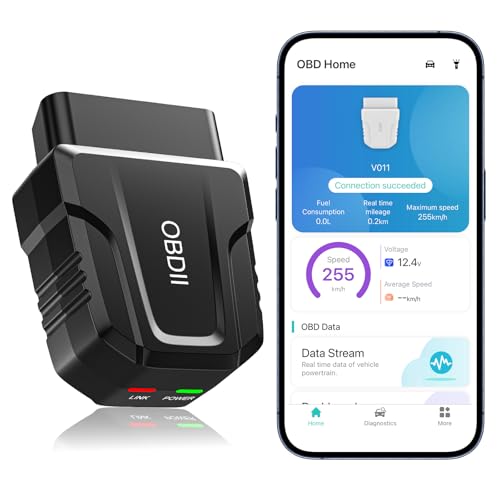
Designed for both novices and car enthusiasts, the OBD2 Scanner Reader Bluetooth Wireless Auto Diagnostic Tool offers an intuitive experience that makes vehicle diagnostics accessible to everyone. Compatible with iOS and Android, it connects effortlessly via Bluetooth 5.4, supporting over 96% of vehicles from 1996 onward. With features like real-time monitoring, fault code management, and clear data visualization, you can easily diagnose issues and manage your car’s performance. Plus, the exclusive app guarantees a smooth user experience. Weighing just 2 ounces, it’s portable and user-friendly, making it a must-have tool for any vehicle owner.
Best For: The OBD2 Scanner Reader is best for both novice users and car enthusiasts seeking an easy-to-use diagnostic tool for their vehicles.
Pros:
- Compatible with over 96% of vehicles from 1996 onwards, making it versatile for various car makes and models.
- Real-time monitoring and intuitive data visualization help users easily diagnose and understand vehicle issues.
- Lightweight and portable design enhances usability, allowing users to carry it conveniently.
Cons:
- Fault codes can only be cleared after repairs, which may require professional assistance in some cases.
- Requires an active Bluetooth connection and vehicle power to function, which could be inconvenient for some users.
- Limited warranty period of 90 days, which may not provide sufficient coverage for long-term use.
BLCKTEC 430 Bluetooth OBD2 Scanner for iPhone & Android

The BLCKTEC 430 Bluetooth OBD2 Scanner stands out as an ideal choice for tech-savvy car owners who want to diagnose and troubleshoot vehicle issues effortlessly. Compatible with both iPhone and Android, this scanner covers vehicles from 1996 to 2023, providing extensive diagnostics for check engine, ABS, SRS, and airbag codes without any subscription fees. You’ll appreciate the wireless connectivity through the RepairSolutions2 App, making it convenient to use. Plus, access a library of repair videos and personalized vehicle reports to assist you with DIY repairs. With a solid 1-year warranty and high customer ratings, it’s a reliable diagnostic tool.
Best For: Tech-savvy car owners seeking an effective and convenient way to diagnose vehicle issues without subscription fees.
Pros:
- Comprehensive diagnostics for various systems like ABS, SRS, and airbag with support for vehicles from 1996 to 2023.
- Wireless connectivity through the RepairSolutions2 App for hassle-free use without the need for wires or batteries.
- Access to a library of repair videos and personalized vehicle reports to assist with DIY repairs.
Cons:
- Limited to supported vehicle models, so users must verify compatibility before purchase.
- Dependent on app functionality, which may vary with updates and device compatibility.
- May require a learning curve for users unfamiliar with OBD2 scanning tools and mobile apps.
Factors to Consider When Choosing an OBD2 Scanner for Android
When choosing an OBD2 scanner for your Android device, you’ll want to contemplate several key factors. Compatibility with your vehicle model, the diagnostic features available, and the type of Bluetooth connectivity play essential roles in your decision. Additionally, app compatibility and ease of use can greatly enhance your overall experience.
Compatibility With Vehicle Models
Choosing the right OBD2 scanner for your Android device hinges on compatibility with your vehicle model. First, verify the scanner works with vehicles from 1996 and newer, as this is when the OBD-II standard was implemented. Next, check if it supports specific makes and models, since some may need specialized features for advanced diagnostics. Look for scanners that mention compatibility with OBD-II/EOBD protocols to guarantee effective communication with your vehicle’s onboard computer. If you own an electric vehicle, confirm the scanner supports newer technologies like WWH-OBD. Finally, review user feedback and compatibility checkers from manufacturers to verify the scanner will function properly with your specific vehicle model and engine type.
Diagnostic Features Offered
Diagnostic features are essential in determining the effectiveness of an OBD2 scanner for your Android device. Look for scanners that can read and clear trouble codes for check engine lights, as well as provide access to live sensor data and freeze frame information. Advanced features like ABS, SRS, and TPMS support are important for in-depth vehicle analysis. Make sure the scanner supports I/M readiness and can perform emissions tests to monitor compliance with environmental regulations. Real-time data monitoring is also significant, allowing you to observe performance metrics while driving for immediate troubleshooting. Finally, check the app compatibility with popular diagnostic applications, as many scanners require third-party apps for full functionality, impacting the range of features you can access.
Bluetooth Connectivity Type
Selecting the right OBD2 scanner for your Android device involves more than just its diagnostic features; Bluetooth connectivity type plays a significant role in ensuring seamless communication between your scanner and smartphone. Bluetooth Low Energy (BLE) is often the preferred choice because it offers faster connections and uses less power than traditional Bluetooth Classic. Plus, some scanners using BLE may not require you to pair with your phone, simplifying the setup. Make sure your scanner is compatible with your device’s Bluetooth version—BLE for iOS and Bluetooth Classic for Android. Opting for a scanner with Bluetooth 5.0 or higher can enhance connection stability and range, ultimately improving your diagnostic experience. Always check compatibility with your diagnostics app for advanced features.
App Compatibility and Support
When you’re in the market for an OBD2 scanner for your Android device, app compatibility and support can make or break your experience. Make sure the scanner supports popular apps like Torque, Car Scanner, and OBD Fusion to get the most out of your diagnostics. Some scanners may require specific third-party apps to access full functionality, so always check compatibility before you buy. Keep in mind that advanced diagnostics for systems like ABS and SRS might not be available on all apps or scanners, limiting what you can diagnose. Additionally, newer vehicles with WWH-OBD might not work with certain scanners, so verify compatibility with your vehicle model. Finally, consider whether the scanner supports Bluetooth LE for easier connectivity.
Ease of Use
How easily can you navigate your OBD2 scanner? Look for models with user-friendly apps that work seamlessly with your Android device. Clear and intuitive data visualization is essential, as it helps you quickly understand vehicle performance metrics and fault codes. If you’re new to diagnostics, choose scanners offering step-by-step repair guides or video tutorials to enhance your learning experience. Opt for devices that require minimal setup, like those with Bluetooth LE connectivity that don’t need complex pairing processes. Finally, consider the availability of customer support options, including manuals and troubleshooting assistance, to help you resolve any issues efficiently. A scanner that prioritizes ease of use will make your diagnostics much more enjoyable.
Price and Value
Finding the right OBD2 scanner for your Android device involves more than just ease of use; price and value play a significant role too. Start by considering the one-time purchase price against any subscription fees that may arise for added features or app usage. Evaluate the diagnostic capabilities the scanner offers relative to its cost; more thorough tools can provide better value for tackling complex issues. Look for scanners that offer unlimited repair reports and user-friendly apps, as these enhance overall value by guiding you through problems. Finally, compare user reviews to understand others’ satisfaction with the price-to-performance ratio, ensuring you choose a scanner that meets your needs without overspending.
Warranty and Return Policy
While selecting an OBD2 scanner for your Android device, it’s crucial to take into account the warranty and return policy. Check the manufacturer’s warranty, as some offer a one-year limited coverage, while others provide longer terms. A solid return policy boosts your confidence; many scanners come with a 30-day return guarantee, letting you return the scanner if it doesn’t meet your expectations. Look closely at warranty terms for defective products—some brands offer free replacements within a specific timeframe. Don’t forget to evaluate customer reviews regarding their experiences with warranties and returns, as high ratings often indicate reliable support. Finally, confirm if the warranty covers shipping costs for returns or replacements, as some companies may require you to pay those expenses.
Advanced Diagnostic Capabilities
When choosing an OBD2 scanner for your Android device, advanced diagnostic capabilities should be at the forefront of your decision-making process. Look for scanners that can perform enhanced diagnostics, reading and clearing not just check engine codes but also ABS, SRS, and TPMS codes. Real-time data access is vital, allowing you to monitor key metrics like engine temperature and RPM while driving. Advanced functions, such as oil reset and DPF regeneration, are essential for routine maintenance. Additionally, make sure the scanner can access manufacturer-specific codes, which can greatly boost its effectiveness. Finally, a device that supports multiple vehicle protocols will enhance compatibility with a wider range of makes and models, making it more versatile for your needs.