
Your Model 3 already has TeslaCam, but a dedicated dash cam can add an independent recording system, interior coverage, or a different view of an incident. The right choice depends less on the biggest resolution claim than on what you need to capture.
These 10 options span straightforward front-and-rear cameras, three-channel setups, and wider-coverage systems. Before choosing, check how each one mounts, gets power, and records while parked.
Best 10 Dash Cam for Tesla Model 3 Picks for 2026
Best Three-Channel Coverage

- Front, cabin, and rear cameras
- STARVIS 2 front sensor with HDR
- 64GB card, GPS, and 5GHz Wi-Fi
Best For: Drivers who want front, rear, and cabin footage
Best Dual-Sensor Option

- STARVIS 2 sensors front and rear
- Dual 1440p recording with HDR
- Voice control, GPS, and 5GHz Wi-Fi
Best For: Drivers prioritizing front and rear image quality
Best Straightforward 4K Setup

- 4K front and 1080p rear video
- STARVIS 2 with HDR and WDR
- Memory card included
Best For: Drivers wanting a two-camera setup with 4K front recording
Best Cabin Recording Controls

- 4K front plus 1080p cabin and rear
- Switchable infrared cabin recording
- 64GB card, Wi-Fi 6, and voice control
Best For: Rideshare and family drivers seeking nighttime cabin footage
Best for GPS Evidence
4K Three-Channel Dash Cam with 128GB Card

- 4K front; 1080p rear and cabin
- Built-in GPS and dual-band Wi-Fi
- 128GB card included; hardwire kit separate
Best For: Three-camera coverage with GPS-tagged footage
Best for Simple Controls
SUVCON Three-Channel 1296p Dash Cam

- Front, cabin, and waterproof rear cameras
- IPS display and 32GB card included
- Infrared cabin lighting; 32GB card limit
Best For: Straightforward three-camera recording with on-device controls
Best for App Access
TOOXYZ J13 4K Three-Channel Dash Cam

- 4K front; 1080p interior and rear
- Wi-Fi app viewing and downloads
- 64GB card included; parking accessory separate
Best For: Phone-based access to three-channel footage
Best for Four-Channel Detail

- 4K front plus 1080p multi-camera recording
- Built-in GPS and WiFi 6 app access
- 128GB card included; parking kit extra
Best For: Front, rear, and side footage with GPS data
Best for Cabin Recording
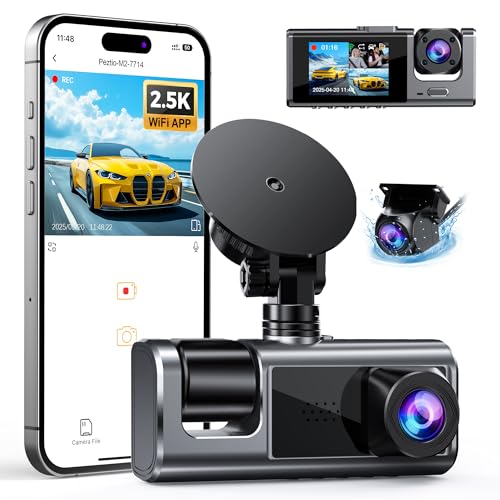
- 2.5K front, 1080p rear and IR cabin
- Wi-Fi app for playback and downloads
- Card and parking hardwire kit sold separately
Best For: Front, rear, and interior recording
Best for All-1080p Coverage
ZMOPO D435 Four-Channel Dash Cam

- Four simultaneous 1080p views
- 128GB card and 5GHz Wi-Fi included
- GPS logger and parking kit cost extra
Best For: Multi-angle footage without a 4K requirement
Best Three-Channel Coverage – REDTIGER F17 4K
If you want a dash cam for Tesla Model 3 driving that records the road and cabin, the REDTIGER F17 offers front, interior, and rear cameras. Its STARVIS 2 front sensor and HDR are useful for changing light, while the interior view adds coverage a two-camera setup misses.
Best For: Drivers who want cabin footage alongside front and rear recording.
Pros:
- Three-camera coverage with 150° front, 160° cabin, and 155° rear views.
- STARVIS 2 front sensor, HDR, and WDR support low-light recording.
- Includes a 64GB card, GPS, and 5GHz Wi-Fi for app access.
Cons:
- Parking monitoring requires a separate hardwire kit.
- For 4K front plus 1080p rear recording, you must turn off the interior camera.
The F17 makes the most sense when interior coverage matters more than recording all three channels at the front camera’s highest resolution.
Best Dual-Sensor Option – VIOFO A229 Plus
For a dash cam for Tesla Model 3 use focused on footage from both ends of the car, the VIOFO A229 Plus pairs front and rear Sony STARVIS 2 sensors with 2K recording on each channel. Front and rear HDR add flexibility in difficult lighting.
Best For: Drivers prioritizing detailed front and rear footage over cabin recording.
Pros:
- Dual STARVIS 2 sensors and HDR support front and rear image quality.
- Records at 1440p on both channels, with a front-camera option up to 60 fps.
- Voice commands, 5GHz Wi-Fi, and quad-mode GPS add convenient controls and trip data.
Cons:
- No interior camera is described.
- Front 1440p at 60 fps is unavailable when HDR is enabled.
Choose the A229 Plus if balanced front-and-rear recording is the priority; its HDR and higher-frame-rate front option require a choice between modes.
Best Straightforward 4K Setup – REDTIGER F7NP
If you prefer a two-camera dash cam for Tesla Model 3 driving, the REDTIGER F7NP records 4K at the front and 1080p at the rear. Its STARVIS 2 sensor, HDR, and WDR address varied lighting without adding a cabin camera to the setup.
Best For: Drivers who want 4K front footage and a rear view with a memory card included.
Pros:
- 4K front and 1080p rear recording with wide-angle lenses.
- STARVIS 2, HDR, WDR, and an F1.5 aperture support recording in changing light.
- Includes a memory card; 5.8GHz Wi-Fi and GPS make footage and trip data accessible in the app.
Cons:
- Parking modes require a separate hardwire kit.
- Does not record the cabin.
The F7NP is a practical pick if front detail matters most and you do not need interior coverage.
Best Cabin Recording Controls – 70mai T800E
For a dash cam for Tesla Model 3 driving that also documents passengers, the 70mai T800E combines 4K front video with 1080p interior and rear views. Switchable infrared recording on the interior camera makes its cabin coverage especially relevant for nighttime trips.
Best For: Rideshare or family drivers who want three views and adjustable cabin night recording.
Pros:
- Records front, interior, and rear views at 4K, 1080p, and 1080p respectively.
- Switchable interior IR, HDR, and noise reduction support low-light footage.
- Includes a 64GB card and rear camera, plus Wi-Fi 6, GPS, and voice control.
Cons:
- Continuous parking monitoring requires a compatible hardwire kit.
- 4G connectivity is not supported.
The T800E stands out for its cabin options and included storage, provided you are comfortable adding a hardwire kit if parked-car monitoring is essential.
Best for GPS Evidence – 4K Three-Channel Dash Cam with 128GB Card
If you want a dash cam for Tesla Model 3 driving that records the road, cabin, and rear view, this three-channel model combines 4K front video with 1080p cabin and rear recording. Built-in GPS adds route, speed, location, and timestamp data to footage.
Best For: Drivers who want three-camera coverage and GPS-tagged recordings.
Pros:
- Includes a pre-installed 128GB memory card.
- 170° front and 165° cabin and rear viewing angles.
- 5.8GHz/2.4GHz Wi-Fi supports app previews and downloads.
- Collision sensor locks impact footage against loop-recording overwrite.
Cons:
- Parking mode requires a separate hardwire kit.
- Windshield-mounted cameras and rear-camera wiring may take more installation effort than a single-camera setup.
The GPS data and included storage make this a practical choice when reviewing an incident matters. Plan for the separate kit if parked-vehicle recording is a priority.
Best for Simple Controls – SUVCON Three-Channel 1296p Dash Cam
For shoppers comparing a dash cam for Tesla Model 3 use, the SUVCON J06 offers front, cabin, and rear views without relying on a phone for everyday controls. Its windshield mount, IPS display, and included 32GB card make it a straightforward plug-in option.
Best For: Drivers who prefer an on-camera display and basic three-way recording.
Pros:
- 170° front view plus 150° cabin and waterproof rear cameras.
- Includes a 32GB card, rear-camera cable, and installation accessories.
- Infrared cabin LEDs and HDR support recording in varied lighting.
Cons:
- 1296p resolution is lower than the 4K front recording offered by the other two models here.
- Listed maximum memory-card support is 32GB.
This is the uncomplicated pick if you value visible controls and an included installation kit over higher front-camera resolution. Check your preferred power connection and cable routing before fitting it in a Model 3.
Best for App Access – TOOXYZ J13 4K Three-Channel Dash Cam
If quick phone access is a priority in a dash cam for Tesla Model 3 driving, the TOOXYZ J13 pairs 4K front recording and 1080p interior and rear views with Wi-Fi access through the Viidure app. A 64GB card is included to get recording started.
Best For: Drivers who want three-channel footage and app-based viewing and downloads.
Pros:
- 170° front view with 120° interior and rear views.
- Wi-Fi app supports footage viewing, downloading, and camera setup without a VIP membership.
- G-sensor emergency locking protects selected clips from loop-recording overwrite.
- Supports cards up to 256GB, with 64GB included.
Cons:
- Parking monitoring requires a separately sold accessory.
- Some Viidure app features, including cloud uploads, require membership.
The J13 is strongest for drivers who expect to review and share clips from a phone. Its basic footage tools do not require a VIP plan, but budget separately for parking-mode hardware.
Best for Four-Channel Detail – ICESKY S03 4K Dash Cam
If you want a dash cam for Tesla Model 3 with more viewpoints than a standard front-and-rear setup, the ICESKY S03 records 4K front footage alongside 1080p rear and side views. Its 3-inch screen lets you check multiple views without opening an app.
Best For: Drivers who want front, rear, and side recording with built-in GPS.
Pros:
- 4K front recording with simultaneous 1080p coverage from the other cameras.
- Built-in GPS records speed, route, location, and time.
- Includes a 128GB card; WiFi 6 supports app viewing and downloads.
Cons:
- 24-hour parking mode requires a separately sold hardwire kit.
- The multiple cameras and adjustable angles take more setup than a simpler dash cam.
Choose this model if side-view footage and GPS data matter to you. Plan the camera placement carefully in your Model 3, and budget for the hardwire kit if parked recording is a priority.
Best for Cabin Recording – 2.5K Three-Channel Dash Cam
For shoppers comparing a dash cam for Tesla Model 3, this three-channel option prioritizes cabin footage alongside the road ahead and behind. It records 2.5K from the front camera and 1080p from both the rear and IR cabin cameras.
Best For: Drivers who want interior recording as well as front-and-rear video.
Pros:
- Three simultaneous views include an IR-equipped cabin camera.
- Wi-Fi app supports live viewing, settings, playback, and downloads.
- Adjustable cameras and a low-profile design offer flexible placement.
Cons:
- No microSD card is included; one is needed before recording.
- 24-hour parking monitoring requires a separately sold compatible Type-C hardwire kit.
This is a practical pick when documenting the cabin matters more than recording the vehicle’s sides. Factor the card and optional parking kit into the total cost.
Best for All-1080p Coverage – ZMOPO D435 Four-Channel Dash Cam
If your priority in a dash cam for Tesla Model 3 is footage from several directions, the ZMOPO D435 records four 1080p views covering the front, rear, left, and right. Its adjustable cameras can also be angled to capture interior footage.
Best For: Drivers who want multi-angle recording and an included memory card without needing 4K video.
Pros:
- Four Full HD cameras record simultaneously.
- Includes a 128GB card and supports 5GHz Wi-Fi app access.
- WDR, night vision, and eight infrared lights support low-light recording.
Cons:
- GPS requires a separately sold logger; it is not built in.
- Parking mode requires a separately sold ACC hardwire kit.
The included card makes it ready for routine recording, while the four views provide flexibility for camera placement. Check the optional accessory costs if GPS tracking or parked monitoring is important to you.
How We Picked the Best Dash Cam for Tesla Model 3
We organized these 10 options around practical differences: camera coverage, stated recording resolution, sensor and HDR specifications, included storage, connectivity, and parking-recording features. Those specifications help narrow the field, but they do not establish real-world image quality or guarantee that every feature works without accessories. Check current listings for the exact kit contents and compare sample footage when available.
Quick Comparison: Which Setup Fits?
Front and rear: The VIOFO A229 Plus and REDTIGER F7NP suit drivers who mainly want an independent view of the road ahead and traffic behind. The VIOFO lists dual STARVIS 2 sensors; the F7NP lists 4K front recording and an included card.
Front, rear, and cabin: The REDTIGER F17, 70mai three-channel model, and several other listed kits add an interior camera. That can help document cabin events, but it also means another view to position and more footage to store.
Broader side coverage: The Icesky left/right setup and the 360 View four-channel model are worth considering if side approaches matter most. Verify the exact camera positions and recording layout before buying; channel counts alone do not tell you what an installation will capture.
Key Buying Factors for a Dash Cam for Tesla Model 3
Coverage and Night Footage
Choose channels based on the gaps you want to fill, not the largest number on the box. Front-and-rear recording is simpler; cabin or side cameras add perspective at the cost of more wiring and potentially smaller per-channel files or lower secondary-camera resolution. A 4K label may apply only to the front camera. For night driving, look for usable sample footage and clear details across bright headlights and dark areas; STARVIS 2 and HDR are helpful specifications, not guarantees.
Installation, Power, and Parking Mode
A Dash Cam for Tesla Model 3 needs a mounting location that preserves visibility and a safe power route that suits your vehicle and camera kit. Confirm cable lengths, connector types, and whether the supplied adapter meets the camera’s power requirements. Parking recording may require a compatible hardwire kit or other supported power solution; check installation requirements rather than assuming a 24-hour claim works out of the box. Plan rear-camera cable routing before purchasing a multi-channel system.
Storage and Everyday Use
Included 32GB, 64GB, or 128GB cards can reduce the initial cost, but multi-channel and high-resolution recording fills storage faster. Confirm the camera’s supported card capacity and type, then check whether loop recording, GPS, Wi-Fi transfer, and app controls match how you expect to retrieve footage. A quick, reliable way to save an important clip matters more than a long feature list.
Who Should Buy Which Dash Cam for Tesla Model 3?
Choose a front-and-rear kit if you want extra evidence without managing cabin footage. Pick a three-channel model if interior events are a priority, or investigate a side-view/four-channel setup if your main concern is coverage around the car. If you are trying to keep costs down, compare the less expensive three-channel listings carefully for actual per-camera resolution, included accessories, and parking-mode requirements. In every category, prioritize a workable installation and footage you can review easily over headline specifications.