
If you’re looking to take control of your car’s diagnostics, having the right OBD2 scanner can make a significant difference. With the convenience of iPhone compatibility, these tools enable you to troubleshoot issues and monitor real-time data with ease. From budget-friendly options to advanced models, there’s something for every driver. So, what should you consider when choosing the best scanner for your needs?
BlueDriver Bluetooth Pro OBDII Scan Tool for iPhone & Android

If you’re a car owner looking for an easy and effective way to diagnose issues, the BlueDriver Bluetooth Pro OBDII Scan Tool is an excellent choice. This scan tool works with gas vehicles from 1996 and up, giving you access to diagnose over 7,000 issues, including check engine, ABS, and airbag troubles. Its wireless Bluetooth connectivity pairs easily with your iPhone or Android device. The user-friendly app not only reads and clears codes but also provides unlimited repair reports and step-by-step repair videos. Plus, you’ll enjoy 24/7 customer support and a 180-day money-back guarantee for peace of mind.
Best For: Car owners seeking an affordable and user-friendly solution for diagnosing vehicle issues without needing to visit a mechanic.
Pros:
- Wireless connectivity allows for easy pairing with iOS and Android devices via Bluetooth.
- User-friendly app includes a wealth of resources like unlimited repair reports and instructional videos.
- No subscription fees mean you pay once and enjoy all features without hidden costs.
Cons:
- Limited to gas vehicles manufactured from 1996 and up, excluding older models and diesel vehicles.
- Some users may find the app’s interface less intuitive compared to other diagnostic tools.
- Advanced features may require a learning curve for those unfamiliar with vehicle diagnostics.
Veepeak OBDCheck BLE Bluetooth OBD II Scanner for iOS & Android

The Veepeak OBDCheck BLE Bluetooth OBD II Scanner is an ideal choice for iPhone users seeking a reliable and wireless solution to diagnose their vehicle’s health. This scanner reads and clears trouble codes, views freeze frame data, and monitors live sensor data, helping you keep track of your car’s performance. It’s compatible with most vehicles from 1996 and newer, though some advanced features may depend on the app you choose. Connecting is a breeze with Bluetooth LE, so you won’t need to deal with pairing. Just download a compatible app, and you’re ready to go!
Best For: Those seeking a wireless and user-friendly OBD-II scanner for diagnosing vehicle issues on their iOS devices.
Pros:
- Wireless Bluetooth LE connection eliminates the need for manual pairing, making it easy to use.
- Compatible with a wide range of vehicles from 1996 and newer, providing broad accessibility.
- Offers essential diagnostic features such as reading and clearing trouble codes and monitoring live sensor data.
Cons:
- Requires a compatible third-party app for full functionality, which may have additional costs.
- Advanced diagnostics and special functions may not be supported for all makes and models.
- Not compatible with certain apps, limiting options for users seeking advanced features.
OBD2 Scanner Reader Bluetooth Wireless Auto Diagnostic Tool for iOS & Android
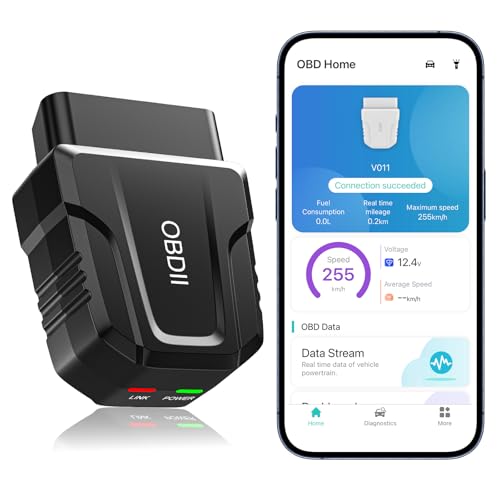
For anyone seeking a reliable and user-friendly diagnostic tool, the OBD2 Scanner Reader Bluetooth Wireless Auto Diagnostic Tool for iOS & Android stands out as an excellent choice. Weighing only 2 ounces, it supports over 96% of car makes and models from 1996 onward. With Bluetooth 5.4 connectivity, you’ll enjoy fast, seamless connections. The device offers extensive testing features, including real-time monitoring and intuitive data visualization, making it easy to understand your car’s health. Plus, the exclusive free app enhances functionality. You’ll save money by addressing issues before they require professional help, making this tool a valuable addition to your toolkit.
Best For: Individuals seeking an affordable and easy-to-use diagnostic tool for car maintenance and troubleshooting.
Pros:
- Supports over 96% of car makes and models from 1996 onward, ensuring broad compatibility.
- Provides real-time monitoring and intuitive data visualization for easier understanding of vehicle health.
- Cost-effective tool that helps users address issues before they escalate, saving on repair costs.
Cons:
- Fault codes can only be cleared after repairs, potentially requiring professional assistance in some cases.
- Requires vehicle power on and mobile Bluetooth activation for connectivity, which may be inconvenient for some users.
- Limited warranty period of 90 days may not provide long-term assurance for buyers.
ANCEL AD310 OBD II Scanner Car Engine Fault Code Reader

Looking for an affordable, user-friendly OBD2 scanner? The ANCEL AD310 Classic Enhanced Universal OBD II Scanner is perfect for you. Compatible with vehicles from 1996 or newer, this compact tool reads and clears diagnostic trouble codes efficiently. Its 2.4-inch screen displays live data and identifies check engine light causes without needing batteries. With a 2.5-foot sturdy cable, it’s easy to transport. You’ll appreciate its accurate results, suitable for both pros and casual users. Rated 4.6 out of 5 stars, the AD310 is a reliable choice for diagnosing emission-related issues. Get ready to keep your vehicle in top shape!
Best For: Those seeking an affordable and user-friendly OBD2 scanner for diagnosing emission-related issues in vehicles from 1996 or newer.
Pros:
- Easy to use with a user-friendly interface, making it suitable for both professionals and casual users.
- Compact and portable design with a sturdy 2.5-foot cable for convenience.
- Provides accurate readings and can quickly identify the causes of check engine lights.
Cons:
- Limited to reading and clearing emission-related diagnostic trouble codes only.
- Not compatible with OBDI vehicles; only supports OBDII interface.
- Does not include a built-in battery, relying on the vehicle’s OBDII Data Link Connector for power.
Panlong OBD2 Scanner Bluetooth for Car Diagnostic

Transform your iPhone into a powerful diagnostic tool with the Panlong OBD2 Scanner Bluetooth. This user-friendly device supports iOS, Android, and Windows, allowing you to read and erase engine fault codes right from your phone. You’ll appreciate real-time monitoring of performance data, while the app helps you quickly turn off the Check Engine Light and run essential tests. Compatible with various OBDII protocols, it works with a wide range of vehicles, ensuring you can diagnose issues efficiently. Plus, by identifying DIY repairs, you might save on costly mechanic visits. Enjoy a 1-year warranty and a 4.2-star rating from satisfied users.
Best For: Car enthusiasts and DIY mechanics looking for an affordable and efficient tool to diagnose engine issues and monitor vehicle performance.
Pros:
- User-friendly app for easy pairing and connection with mobile devices.
- Supports multiple OBDII protocols and a wide range of vehicles for versatile diagnostics.
- Helps identify potential DIY repairs, saving costs on professional mechanic visits.
Cons:
- May require additional third-party apps for full functionality, which could vary in quality.
- Some users may experience connectivity issues depending on their device or vehicle model.
- Limited to OBDII vehicles, so older models may not be compatible.
FIXD Bluetooth OBD2 Scanner for iPhone & Android

The FIXD Bluetooth OBD2 Scanner is an ideal choice for car owners seeking an easy and efficient way to diagnose vehicle issues. It scans over 39,000 problems in your vehicle, including Check Engine lights and enhanced codes. The free app offers clear explanations instead of confusing error codes, alerting you to severe problems or necessary maintenance. You can manage multiple vehicles, track mileage, and share results with family or repair shops. Compatible with OBD2 vehicles from 1996 onward, it connects via Bluetooth to your iPhone or Android, ensuring quick, wireless diagnostics whenever you need them. Enjoy a 14-day premium trial for added features!
Best For: Car owners looking for a user-friendly and efficient solution to diagnose vehicle issues quickly and manage multiple vehicles.
Pros:
- Easy to use with a free app that provides clear explanations of car issues.
- Scans and identifies over 39,000 problems, including Check Engine lights.
- Compatible with OBD2 vehicles from 1996 onward and connects via Bluetooth to iPhone and Android devices.
Cons:
- The premium features require a subscription after the 14-day trial.
- May not cover all vehicle makes and models comprehensively.
- Limited functionality without an internet connection for app updates and support.
Veepeak OBDCheck BLE+ Bluetooth OBD II Scanner for iOS & Android

For iPhone users seeking an efficient and user-friendly OBD2 scanner, the Veepeak OBDCheck BLE+ stands out with its wireless Bluetooth functionality. Weighing only 60 grams, it’s compact and easy to use. This scanner works seamlessly with compatible third-party apps like Car Scanner ELM OBD2, allowing you to read and clear trouble codes, view live sensor data, and check I/M readiness. It supports 1996+ OBD-II compliant vehicles in the US. While advanced diagnostics are limited, its customer rating of 4.5 stars reflects satisfaction. Plus, it comes with a one-year warranty, ensuring peace of mind with your purchase.
Best For: iPhone users looking for a compact and efficient OBD2 scanner for their vehicles.
Pros:
- Compact and lightweight design makes it portable and easy to handle.
- Compatible with a variety of third-party apps for enhanced functionality.
- High customer satisfaction with a rating of 4.5 out of 5 stars.
Cons:
- Limited to generic OBD-II functions; advanced diagnostics are not supported.
- Certain features may require additional purchases within specific apps.
- Pre-2008 vehicle models may not be fully compatible with some functions.
OBDLink MX+ OBD2 Bluetooth Scanner for iPhone, Android, and Windows

If you’re looking to turn your iPhone into a professional-grade diagnostic tool, the OBDLink MX+ OBD2 Bluetooth Scanner is your top pick. Compatible with iPhone, Android, and Windows, it transforms your device for serious car diagnostics. You can easily clear the Check Engine Light and monitor live parameters like ABS and TPMS. Plus, it offers enhanced OEM support for popular brands like Ford, GM, and Toyota. With built-in over-voltage protection and regular firmware updates, you can trust its reliability. Enjoy high customer ratings and a solid warranty, making the OBDLink MX+ a smart choice for any car enthusiast.
Best For: Car enthusiasts and DIY mechanics looking for a reliable and versatile diagnostic tool for their vehicles.
Pros:
- Easy to use: Compatible with iPhone, Android, and Windows, making it accessible for a wide range of users.
- Comprehensive diagnostics: Clears Check Engine Light and monitors live parameters, providing extensive vehicle data.
- Strong customer feedback: High rating of 4.6 out of 5 stars from over 15,000 reviews indicates strong user satisfaction.
Cons:
- Limited support for some brands: While it offers enhanced OEM support for several major brands, it may not cover all vehicles.
- Requires additional apps for full functionality: Users need to download specific apps like FORScan or Torque to utilize all features.
- Small size may be easy to misplace: The compact dimensions could lead to it being lost or overlooked in a busy garage.
2026 Bluetooth OBD2 Scanner for iPhone & Android
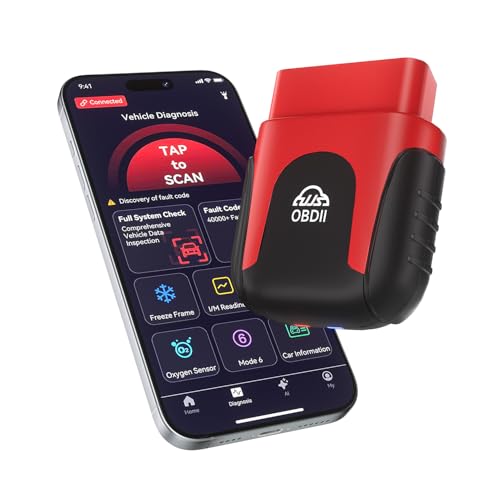
Looking for a reliable OBD2 scanner that works seamlessly with both iPhone and Android devices? The 2026 Bluetooth OBD2 Scanner is your perfect match. This AI-powered tool checks engine codes and provides real-time data, compatible with all vehicles from 1996 onwards—no subscription fees required. Its ultra-compact design plugs into the OBD2 port for 24/7 monitoring. Enjoy instant readings and clear check engine lights with a one-tap full vehicle scan. With lifetime updates and a free app supporting both platforms, you’ll access over 35,901 fault codes. Plus, you get lifetime warranty and exceptional customer support for peace of mind.
Best For: Car owners seeking an easy-to-use, reliable OBD2 scanner that works with both iPhone and Android devices for comprehensive vehicle diagnostics.
Pros:
- AI-powered features provide actionable repair advice and health reports without requiring mechanical knowledge.
- Compact design allows for convenient 24/7 monitoring by plugging into the OBD2 port.
- Lifetime warranty and free updates ensure long-term value and access to an extensive fault code library.
Cons:
- May not be suitable for older vehicles manufactured before 1996.
- Initial setup and Bluetooth connection might be challenging for some users.
- Limited to OBD2 protocol vehicles, which may exclude certain specialized or international models.
OBD2 Bluetooth Scanner for iPhone and Android

The OBD2 Bluetooth Scanner stands out as the perfect choice for tech-savvy car owners who want to take control of their vehicle’s diagnostics through their iPhone or Android device. This enhanced tool reads and erases diagnostic trouble codes, resets check engine lights, and monitors real-time data like engine RPM and coolant temperature. Compatible with most 1996 and newer OBDII compliant vehicles, it works seamlessly with popular brands such as Ford, Honda, and Toyota. With support for various free mobile apps, you’ll easily access your car’s data. Plus, it comes with a 2-year warranty, ensuring your investment is protected.
Best For: Tech-savvy car owners looking to monitor and control their vehicle’s diagnostics via smartphone apps.
Pros:
- Easy to use with both iPhone and Android devices through compatible apps.
- Provides real-time data monitoring and diagnostics for most 1996 and newer vehicles.
- Comes with a 2-year warranty for added peace of mind.
Cons:
- Not compatible with 24V diesel vehicles, hybrids, or older models that do not meet OBDII standards.
- Customer rating of 3.7 out of 5 stars indicates mixed feedback.
- Requires an app to connect on iOS devices, which may limit usability for some users.
Factors to Consider When Choosing an OBD2 Scanner for iPhone
When choosing an OBD2 scanner for your iPhone, you’ll want to take into account several key factors. Compatibility with your vehicle model is essential, as is the scanner’s diagnostic capabilities and features. Don’t forget to check for a user-friendly app interface and reliable wireless connectivity options to enhance your real-time data monitoring experience.
Compatibility With Vehicle Models
Choosing the right OBD2 scanner for your iPhone hinges on ensuring compatibility with your vehicle model. Most scanners work with vehicles manufactured from 1996 onward, covering many gas and light diesel options in North America and beyond. However, it’s essential to verify that the scanner supports OBD-II/EOBD protocols specific to your car’s diagnostic system. Some scanners may struggle with newer models that use advanced protocols like WWH-OBD or require unique apps for full functionality. Additionally, enhanced diagnostic features, such as ABS, SRS, and TPMS support, can vary greatly between scanners and may not be universal across all makes and models. Always confirm compatibility before purchasing to avoid any disappointments.
Diagnostic Capabilities and Features
Understanding compatibility with your vehicle model is just the starting point. You’ll want an OBD2 scanner that not only reads and clears trouble codes for the check engine light but also addresses advanced systems like ABS, SRS, and TPMS. This broadens your diagnostic capabilities considerably. Look for scanners with live data monitoring, enabling you to check real-time vehicle parameters while driving. It can help pinpoint issues more effectively. Additionally, choose a device that provides access to repair databases, offering detailed explanations of trouble codes. This insight aids in understanding potential fixes. Make sure your scanner supports multiple OBD-II protocols for greater compatibility across various makes and models, enhancing its overall functionality.
User-Friendly App Interface
A user-friendly app interface can make all the difference in your experience with an OBD2 scanner for iPhone. Look for apps that simplify the diagnostics process, allowing you to navigate vehicle issues without getting lost in technical jargon. Clear explanations and visual representations of diagnostic data make it easier to interpret results at a glance. Many apps also offer step-by-step repair guides and video tutorials, empowering you to tackle DIY repairs confidently. Compatibility with popular third-party apps can expand functionality, giving you tailored diagnostics that fit your needs. Additionally, a responsive design that supports real-time monitoring and alerts enhances engagement, ensuring you stay on top of maintenance and avoid potential issues.
Wireless Connectivity Options
When it comes to selecting an OBD2 scanner for your iPhone, wireless connectivity options play an essential role in your overall experience. Most wireless scanners use Bluetooth technology, allowing for easy diagnostics without messy cables. Bluetooth Low Energy (BLE) is a popular choice, especially for iOS devices, thanks to its low power consumption and quick connection. Before purchasing, check if the scanner requires a compatible third-party app to function properly. While most scanners connect seamlessly, some may not support Bluetooth pairing through your phone’s menu, which can hinder usability. Enhanced Bluetooth features can further improve your experience by enabling faster connections and better range, making it easier to monitor your vehicle while driving.
Real-Time Data Monitoring
While you’re choosing an OBD2 scanner for your iPhone, real-time data monitoring is an essential factor to take into account. This feature lets you observe live vehicle parameters like engine RPM, coolant temperature, and vehicle speed, enhancing your diagnostic accuracy. Many scanners provide visual data through graphs and charts, making it easier to grasp your vehicle’s performance and health. Monitoring real-time data can help you spot potential issues before they escalate, saving you time and repair costs. Advanced scanners even offer live data streaming, which is invaluable for diagnosing intermittent problems that may not trigger a fault code. If you’re a car enthusiast or DIY mechanic, these features can help you fine-tune your vehicle’s performance on the go.
Price and Warranty Considerations
Considering the varying price ranges of OBD2 scanners for iPhone, it’s essential to find one that fits your budget without sacrificing quality. You’ll encounter options ranging from budget-friendly models to advanced scanners with additional features. Evaluate the warranty period too; some scanners offer lifetime warranties, while others may have limited guarantees. Be wary of hidden subscription fees that can add long-term costs after your initial purchase. Customer reviews can provide insights into the reliability of warranty support, helping you gauge the manufacturer’s responsiveness when issues arise. Finally, remember to factor in potential costs for compatible apps, as some advanced features may require extra purchases for full functionality.
Support for Third-Party Apps
Finding the right OBD2 scanner for your iPhone also involves understanding its compatibility with third-party apps. Many scanners rely on these apps to access full functionality, especially for advanced diagnostics and vehicle-specific features. The choice of app can greatly affect what your scanner can do; some offer only basic functions, while others provide enhanced diagnostics tailored to specific makes and models. Be sure to check if the recommended apps are free or require in-app purchases for advanced features. Popular options like Torque, OBD Fusion, and Car Scanner can improve your experience by offering user-friendly interfaces and detailed data. Finally, verify the apps support the specific vehicle protocols and functions you need, such as ABS, SRS, and live data monitoring.
Ease of Use and Setup
When choosing an OBD2 scanner for your iPhone, ease of use and setup can greatly impact your overall experience. Look for scanners with user-friendly apps that are compatible with iOS, ensuring a straightforward setup without complicated configurations. Many scanners support Bluetooth connections, which means you won’t have to deal with messy cables while connecting to your iPhone. Opt for devices that offer automatic pairing through the app to save time and enhance your experience. It’s also wise to select scanners that come with clear instructions and video tutorials for initial setup and troubleshooting. Finally, consider compact designs that stay plugged into the OBD2 port without interfering with vehicle controls or needing frequent disconnection.